Text Mode Selection
The mode is programmed with the MDA/CGA mode register and with the format registers
located at Hornet indexes -20h to -2Ch. In addition, mode changes usually require
software to clear and/or redraw the display and initialize the application registers
within the CRTC.
Bit 1 of the mode register is cleared to select text modes. Bits 0, 4, and 7 are unused in text modes. Bit 3 is used for blanking and does not affect the mode. Bits 2, 5, and 6 affect the way character attributes are treated but do not affect the mode. Bits 2 and 5 should be set for compatible MDA or Jaguar text modes. Only bit 5 should be set for compatible CGA modes.
This display controller handles bit 2 of the mode register a little differently than standard adapters. Standard MDA adapters will ignore bit 2. On standard CGA adapters, bit 2 only disables color burst on the composite video signal. This means that the display will appear monochrome on composite video monitors but will remain color on RGB adapters.
The following table describes what to put in the display controller registers for some sample text modes.
The number of characters per page is just the number of logical columns times the number of logical rows. The number of available pages is computed based on a 16-KB frame buffer and two bytes required per character. The result is rounded down to give the number of whole pages available.
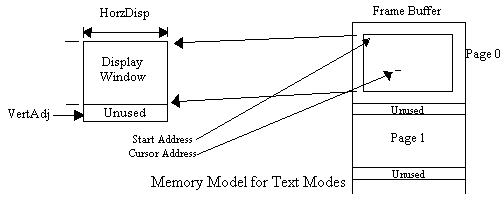
The horizontal displayed (HorzDsp) register is set to the number of physical columns. The available choices are 80, 64, and 40 columns which corresponds to character widths of 8, 10, and 16 dots. Character widths of 8 and 10 dots correspond to character sizes of 8 and 10 pixels. A character width of 16 dots may be achieved with character sizes of 8 or 16 pixels, by using the DoubDot bit in the CellWid register. The row size offset (RowOff register) is set to the difference between the number of logical columns and the number of physical columns.
The vertical displayed (VertDsp) register is set to the number of physical rows. The maximum scan line (MaxScan) register is set to one less than the height in scan lines of the character cell. The number of physical rows times the character height should be less than or equal to the number of scan lines in the display. The difference is placed in the vertical adjust (VertAdj) register. This register defines the number of unused scan lines at the bottom of the display.
The cursor (CurStart and CurStop registers) and underline (Underline register) are chosen to match the character font. To be MDA/CGA compatible: 1) the cursor height should be set to two scan lines, 2) the cursor stop line should correspond to the last line of the cell for short fonts and the second to the last line for tall fonts, 3) the underline should correspond to the cursor stop line.
The display start address (DspStHi and DspStLo registers) and the cursor address (CurLocHi and CurLocLo registers) should be set to the first row and column on the page. This is computed by the number of characters per page times the desired page number. This number is usually rounded up to the nearest kByte so that pages start on kByte boundaries. This number is not multiplied by 2 because the CRTC generates character (word) addresses, not byte ad dresses.
The cursor blink mode (in the CurStart register), and the shading and text color mapping (ShadeReg) register do not affect the mode, but they should also be initialized at mode changes.
Register Values for HP Palmtop Text Modes
Attribute           Attribute
Name
==========================================================================================
Mode/Zoom       0/0   1/1   2/2   3/3   2/80  3/81  2/82  3/83  2/84  3/85  7/7   7/21
------------------------------------------------------------------------------------------
Compatibility   CGA   CGA   CGA   CGA   CGA   CGA   CGA   CGA   CGA   CGA   95LX  MDA
------------------------------------------------------------------------------------------
Physical size   40x25 40x25 80x25 80x25 64x18 64x18 40x25 40x25 40x16 40x16 40x16 80x25
------------------------------------------------------------------------------------------
Logical size    40x25 40x25 80x25 80x25 80x25 80x25 80x25 80x25 80x25 80x25 80x25 80x25
------------------------------------------------------------------------------------------
Character size  8x8   8x8   8x8   8x8   10x11 10x11 8x8   8x8   16x12 16x12 16x12 8x8
------------------------------------------------------------------------------------------
Dots/Pixel      2     2     1     1     1     1     2     2     1     1     1     1
------------------------------------------------------------------------------------------
Chars per page  1000  1000  2000  2000  2000  2000  2000  2000  2000  2000  2000
------------------------------------------------------------------------------------------
Avail.  pages   8     8     4     4     4     4     4     4     4     4     4     4
------------------------------------------------------------------------------------------
Register        Value (in hex)
==========================================================================================
DspSetUp        03  03  03  03  03  03  03  03  03  03  01  01
------------------------------------------------------------------------------------------
RowTime         41  41  41  41  41  41  41  41  41  41  41  41
------------------------------------------------------------------------------------------
HorzDsp         28  28  50  50  40  40  28  28  28  28  28  50
------------------------------------------------------------------------------------------
ChrWidth        04  04  00  00  02  02  04  04  01  01  01  00
------------------------------------------------------------------------------------------
RowOff          00  00  00  00  10  10  28  28  28  28  28  00
------------------------------------------------------------------------------------------
VertDsp         19  19  19  19  12  12  19  19  10  10  10  19
------------------------------------------------------------------------------------------
MaxScan         07  07  07  07  0a  0a  07  07  0b  0b  0b  07
------------------------------------------------------------------------------------------
VertAdj         00  00  00  00  02  02  00  00  08  08  08  00
------------------------------------------------------------------------------------------
Underline       07  07  07  07  0a  0a  07  07  0b  0b  0b  07
------------------------------------------------------------------------------------------
ShadeReg        10  12  10  12  10  12  10  12  10  12  00  00
------------------------------------------------------------------------------------------
CurStart        06  06  06  06  09  09  06  06  0a  0a  0a  06
------------------------------------------------------------------------------------------
CurStop         07  07  07  07  0a  0a  07  07  0b  0b  0b  07
------------------------------------------------------------------------------------------
Mode Register   28  28  29  29  29  29  29  29  29  29  2d  2d
------------------------------------------------------------------------------------------
Text Mode Memory Model
In text modes the 16-KB frame buffer is divided into pages. Each page is an array of character/attribute pairs organized into rows. The character/attribute pairs of each row of the display are stored in a vector sequentially from left to right. The top row of the display is stored first with lower rows following.
The following formula may be used to calculate the address of a character in the frame buffer, given its page number and its row and column on the page:
The number of bytes per page is twice the number of characters per page, rounded up to the nearest kByte. This formula may be used to calculate the address given its row and column on the physical display:
Where start_address is the contents of the (DspStHi/DspStLo register pair). If the page is the same size as the physical display, the row offset register should be set to zero, and the formula simplifies to:
Cursor Generation
The cursor is generated by setting the Cursor Address register (CurLocHi and CurLocLo) to
point to a character within the current physical window on the current page. If the
Cursor Address register does not point to an address within the physical window, the
cursor is not generated.
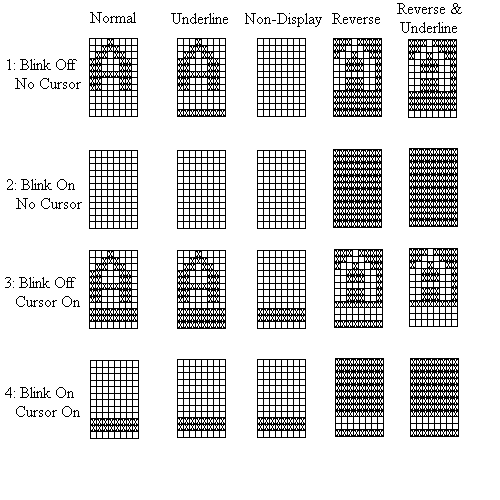
The cursor is defined by the CurStart and CurStop registers. The blinking of the cursor is controlled by the CurBlinkMode bits in the CurStart register. Blinking can be set to one of four options:
Black and White Text Attributes
This section describes attribute processing in MDA-compatible black-and-white text modes.
Black-and-White is selected by setting bit 2 of the MDA/CGA Mode register.
In black and white mode, bits 0-2 and 4-6 of the attribute byte select 1 of 4 mutually exclusive attributes as follows:
Black and White Attributes
Attribute Byte
76543210        Attribute
==========================================================================================
000 000         Non-display (white on white)
------------------------------------------------------------------------------------------
xxx 001         Underline (black on white)
------------------------------------------------------------------------------------------
111 000         Reverse video (white on black)
------------------------------------------------------------------------------------------
all others      Normal (black on white)
------------------------------------------------------------------------------------------
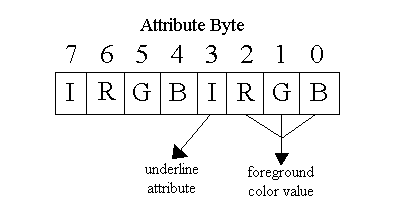
Bit 3 of the attribute byte may be used to intensify the foreground or to underline the character. If bit 6 of the mode register is clear, bit 3 of the attribute byte intensifies the foreground. If bit 6 of the mode register is set, bit 3 underlines the character.
Bit 7 of the attribute byte may be used to intensify the background or to cause the character to blink. If bit 5 of the mode register is clear, bit 7 of the attribute byte intensifies the background. If bit 5 of the mode register is set, bit 7 causes the character to blink at 1 Hz.
Only ON pixels can be intensified; it has no meaning for OFF pixels. Therefore, bit 3 of the attribute byte, if enabled, can only intensify the foreground of normal or underlined characters. It is ignored for non-displayed or reversed characters. Also, bit 7 of the attribute byte, if enabled, can only intensify the background of reversed characters. It is ignored for non-displayed, normal, or underlined characters.
The intensity attribute is rendered using frame-rate shading. This technique is described in the section on shading. ON pixels are displayed at 100% black, OFF pixels are displayed at 0% black (white), and intensified ON pixels are displayed at 66% black (dark grey). Intensified OFF pixels remain at 0% black. The Invert bit in the Shade register can reverse these levels, giving: 0% for ON pixels, 33% (light grey) for intensified ON pixels, and 100% black for OFF pixels. The attributes are added to a character using the following process:
The rows of the figure attempt to show how cursors and blinking affects the display over time. The first row shows a non-blinking character that is not overlaid with the cursor. The first row also shows how the character would appear if it was overlaid with a non-displayed (invisible) cursor.
Row 2 shows the effect of blinking. If the blink attribute is set, the character is displayed like row 1 for half of each second, and like row 2 for the other half of each second. Overlaying this character with a non-displayed cursor would have no effect.
Row 3 shows a non-blinking character overlaid with a non-blinking cursor. If the cursor is set to blink, the character spends half of each second displayed like row 1 and the other half like row 3. If the cursor is set to flash, the character is displayed like row 1 for every other frame and like row 3 for the remaining frames.
Row 4 shows the effect of the blinking attribute on a character overlaid by a cursor. If the cursor is nonblinking, the character alternates between the row 3 and row 4 displays at half a second per display. If the cursor is blinking, the character alternates between the row 1 and row 4 displays at half a second per display. If the cursor is flashing, the character spends half of each second alternating (at half the frame rate) between the row 1 and row 3 display, and the other half of each second altern ating between the row 2 and row 4 display.
For MDA compatibility, select black and white processing with blinking enabled and the bit 3 underlining attribute disabled.
Color Text Attributes
This section describes attribute processing in color text modes. Color for text modes is
selected by clearing bit 2 of the MDA/CGA mode register. In color mode, the foreground
(on dots) and the background (off dots) of the character are each assigned a four-bit
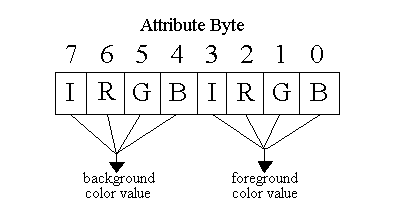
color value. The bits of the color value are designated I for intensity, R for red, G
for green and B for blue.
With bits 5 and 6 of the MDA/CGA mode register clear, the lower nibble of the attribute byte provides the 4-bit foreground color value and the upper nibble of the attribute byte provides the 4- bit background color value.
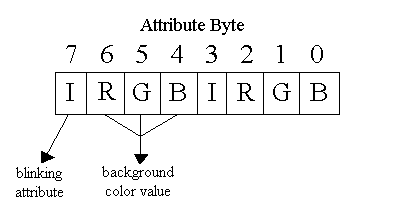
With bit 5 of the MDA/CGA mode register set, the upper nibble of the attribute byte is redefined. Bit 7 of the attribute byte becomes an attribute bit for blinking and bits 4-6 provide 3 bits of the background color value. The most significant bit (the I- intensity bit) of the background color value is forced to zero.
With bit 6 of the MDA/CGA mode register set, the lower nibble of the attribute byte is redefined. Bit 3 of the attribute byte becomes an attribute bit for underlining and bits 0-2 provide 3 bits of the foreground color value. The most significant bit of the foreground color value is forced to zero.
Text Color Processing
In color text modes, the foreground and background of each character may each have one of
16 color values. Unfortunately, this display controller is only capable of rendering
four different shades. The shading and text color mapping register is used for selecting
a mapping technique to deal with this.
Bit     Description
==========================================================================================
3-2     ShadeMode - Shading technique selection These bits select the frame-rate shading
        technique to be used to render the shades on the display.  For more information,
        "Shading Techniques" on page 15-533.
------------------------------------------------------------------------------------------
1       MAPSEL - color mapping selection Clearing this bit selects a monochrome mapping
        style.  Setting it selects a color mapping style.  In the monochrome style, the
        logical-OR of the R, G, and B bits turns the pixel on.  If they are not
        intensified, OFF and ON pixels are mapped to shades 0 and 3, respectively.  If
        intensified, they are mapped to shades 1 and 2, respectively.  In the color style,
        the R and G bits of the color value are used to directly form the shading value.
        R is the most significant bit and G is the least significant.  The I and B bits
        are ignored.
------------------------------------------------------------------------------------------
0       Invert - Invert shading values The shading value determines the number of frames
        out of every three that each pixel is turned on.  This allows the shading value to
        control the duty cycle of the pixel to values of 0, 33, 67, or 100 percent.  The
        higher duty cycles correspond to darker pixels.  If this bit is clear, then
        increasing shading values result in darker shades.  If this bit is set, the
        shading values are reversed so that increasing shading values result in lighter
        shades.
------------------------------------------------------------------------------------------
The monochrome mapping technique works well for applications designed to make use of
colors 0, 7, 8, and 15 (decimal). These colors correspond to black, dark grey, white,
and bright white. Those colors will be mapped to shades 0, 3, 1, and 2, corresponding to
shades white, black, light grey, and dark grey.The color mapping technique works well for 'colorful' applications. These applications typically use white on blue or green on blue with red characters or reversed colors for highlight.
Font Table
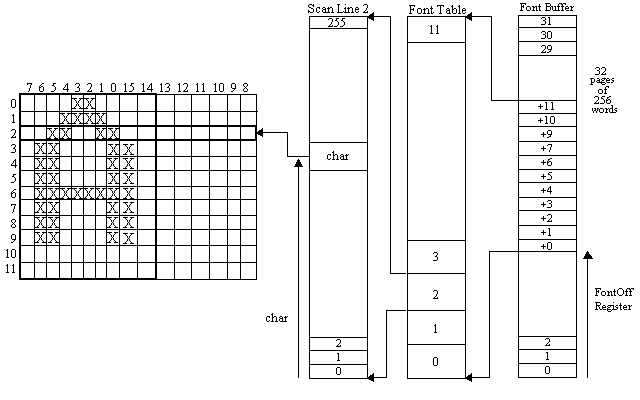
The font buffer is a 16-KB buffer allocated by registers in the memory controller. It is
divided into 32 pages of 256 words each. Each page contains the pixel information for a
given scan line of all 256 of the characters in a character set.
These pages are grouped into font tables. A font table contains all of the pixel information for a given character set. A font table requires as many pages as there are scan lines in that character set, up to 32 lines. The higher numbered scan lines correspond to higher pages within the font table (with wraparound). The font buffer can contain font tables for several character sets. The FontOff register points to the page containing the first (topmost) scan lines of the c urrent character set.
The character can be 8, 10, or 16 pixels wide. The pixels for each line are left justified and byte swapped. The most significant bit of the even-addressed byte corresponds to the leftmost pixel of the character. The rightmost 6 pixels are not used in 10 bit fonts. The rightmost 8 pixels (the whole odd addressed byte) is not used in 8 bit fonts.
The address of the word that corresponds to a given scan line for any given character in the font table may be computed as follows: