Graphics Mode Selection
The graphics mode is programmed with the MDA/CGA mode register and with the format
registers located at Hornet indexes -20h to -2Ch. In addition, mode changes usually
require software to clear and/or redraw the display and initialize the application
registers within the CRTC.
Bit 1 of the mode register is set to select graphics modes. Bits 0, 2, 5, 6, and 7 are unused in graphics modes. Bit 3 is used for blanking and does not affect the mode. With the JagGrMode bit in the DspSetUp register clear, bit 4 selects between CGA compatible low-resolution and high-resolution graphics. Bit 4 is cleared for 320x200 4-color graphics and set for 640x200 black and white graphics. With the JagGrMode bit set, Jaguar com patible 240x128 graphics is selected and bit 4 of the mode register is ignored.
The following table describes what to put in the display controller registers for some sample graphics modes.
The Underline, CurStart, CurStop, and Cursor Address (CurLocHi and CurLocLo) registers are not used in graphics modes. The RowOff and start address (DspStHi and DspStLo) registers should be set to zero in CGA graphics modes because the frame buffer will not support displays larger than those shown.
Register values for Cougar Graphics Modes
Attribute Name  Attribute
==========================================================================================
Mode/Zoom       4/4         5/5         6/6         20/20
------------------------------------------------------------------------------------------
Compatibility   CGA         CGA         CGA         Jaguar
------------------------------------------------------------------------------------------
Resolution      320x200     320x200     640x200     240x128
------------------------------------------------------------------------------------------
Character size  8x8         8x8         8x8         6x8
------------------------------------------------------------------------------------------
Bits/Pixel      2           2           1           1
------------------------------------------------------------------------------------------
Dots/Pixel      2           2           1           2
------------------------------------------------------------------------------------------
Colors          4           4           2           2
------------------------------------------------------------------------------------------
Pixels/Byte     4           4           8           8
------------------------------------------------------------------------------------------
Bytes per page  16000       16000       16000       3840
------------------------------------------------------------------------------------------

Register        Value (in hex)
==========================================================================================
DspSetUp        03  03  03  05
------------------------------------------------------------------------------------------
RowTime         41  62  62  62
------------------------------------------------------------------------------------------
HorzDsp         28  28  28  0f
------------------------------------------------------------------------------------------
ChrWidth        01  01  01  05
------------------------------------------------------------------------------------------
RowOff          00  00  00  00
------------------------------------------------------------------------------------------
VertDsp         64  64  64  80
------------------------------------------------------------------------------------------
MaxScan         01  01  01  00
------------------------------------------------------------------------------------------
VertAdj         00  00  00  24
------------------------------------------------------------------------------------------
Underline       07  07  07  07
------------------------------------------------------------------------------------------
ShadeReg        02  0c  00  00
------------------------------------------------------------------------------------------
CurStart        06  06  06  06
------------------------------------------------------------------------------------------
CurStop         07  07  07  07
------------------------------------------------------------------------------------------
Mode Register   0a  0e  1e  0e
------------------------------------------------------------------------------------------
The CGA graphics display is set up like it has 100 rows of 40 characters that are 2 pixels high.
The HP 95LX graphics display is set up like it has 128 rows of 15 characters that are 1 pixel high. The VertAdj register is set to half the number of unused rows. This number of unused rows appears at both the top and bottom of the display in Jaguar mode. This causes the smaller Jaguar display to appear centered on the 640- by 200-dot display module.
CGA-Compatible Memory Model
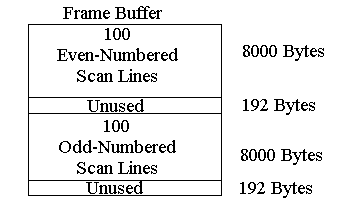
In CGA-compatible graphics modes the frame buffer is composed of two arrays. The first
array corresponds to the pixel data for the even scan lines and starts at the beginning
of the frame buffer. The second array corresponds to the pixel data for the odd scan
lines and starts in the middle of the frame buffer (start + 8192 bytes). Each array
takes 8000 bytes which effectively uses up the 16-KB frame buffer.
CGA-Compatible High Resolution Mode
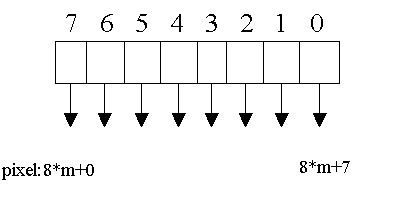
In high resolution mode, each half of the frame buffer is organized as 100 lines of 640
pixels with one bit per pixel. Each pixel corresponds to a dot on the display giving the
display an effective resolution of 640 by 200 pixels. The pixels are assigned an
x-coordinate from 0 to 639 numbered left to right, and a y-coordinate from 0-199 numbered
from top to bottom. The byte address in the frame buffer and the bit offset within the
byte of any pixel can be calculated as follows:
where / is integer division (with truncation) and % is integer modulus (remainder). The segment of the frame buffer should be set to B800h by setting the CGAMode bit in the DspSetUp register.
CGA-Compatible Low Resolution Mode
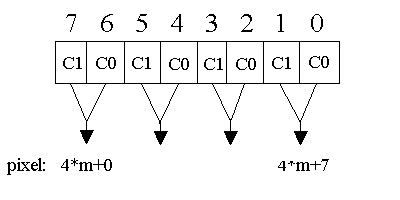
In low resolution mode, each half of the frame buffer is organized as 100 lines of 320
pixels with two bits per pixel. Each pixel corresponds to a pair of adjacent dots on the
display. This reduces the display's effective resolution to 320 by 200 pixels but allows
each pixel to take on one of four color values. The pixels are assigned an x- coordinate
from 0 to 319 numbered left to right, and a y- coordinate from 0-199 numbered from top to
bottom. The byte address in the frame buffer of any pixel can be calculated as
follows:
where / is integer division (with truncation) and % is integer modulus (remainder). The bit offsets within the byte of the most significant bit (MSB) and the least significant bit (LSB) of the two bit color value are given as:
The segment of the frame buffer should be set to B800h by setting the CGAMode bit in the DspSetUp register.
HP 95LX-Compatible Graphics
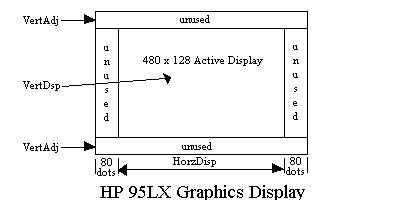
In Jaguar-compatible graphics mode, part of the display viewing area is active and part
is unused (inactive). Setting the JagGrMode bit in the DspSetUp register allows the
active part to be centered on the physical display.
The vertical division is accomplished by the VertDsp and VertAdj registers. The VertDsp register sets the number of vertical scan lines in the active part of the display window. In JagGrMode, the VertAdj register sets the number of unused scan lines both above and below the active part. The total scan lines in these three areas must equal the number of vertical scan lines in the physical display.
The horizontal division is accomplished by setting the JagGrMode bit. This reduces the width of the physical display by 160 dots by blanking 80 dots on the left and right sides. The active part of the display is set to 240 pixels wide by setting the HorzDsp register to 15 words. Setting the DoubDot bit in the ChrWidth register causes those 240 pixels to control 480 horizontal dots.
The total effect of all of this is to expand a 240- by 128-pixel Jaguar-compatible display onto 480 by 128 dots in the center of a 640 by 200 dot display.
HP 95LX-Compatible Graphics Memory Model
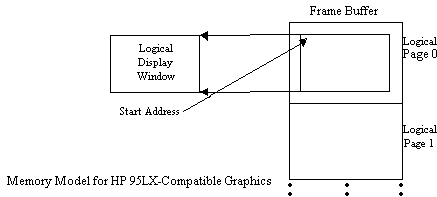
In HP 95LX-compatible graphics mode the frame buffer can be divided into logical pages.
Each logical page contains the pixel information for the display in a single array. The
array is organized by scan lines with one bit per pixel. The logical page can be wider
than the logical display window by setting the Row Offset register to a non-zero value.
The Start Address register can be used for panning and selecting the logical page.
The pixels in the Jaguar logical display window are assigned an x-coordinate from 0 to 239, numbered left to right, and a y- coordinate numbered from top to bottom starting with zero. Given the coordinates of any pixel in the logical display window, the byte address in the frame buffer and the bit offset within the byte for that pixel can be calculated as follows:
Graphics Color Processing
In CGA high-resolution and Jaguar-compatible graphics modes, each pixel's color value can
be either zero or one. A zero value corresponds to a light dot and a one corresponds to
a dark dot. The Invert bit in the ShadeReg register can be used to reverse this
definition.
In CGA low-resolution graphics mode, each pixel's color value can vary from zero to three. The zero value corresponds to the lightest shade and a three corresponds to the darkest shade. This definition can also be reversed with the Invert bit.
The ShadeReg register defines how these color values are rendered on the display. In graphics modes, this register is defined as follows:
Bit     Description
==========================================================================================
3-2     ShadeMode - shading technique selectionThese bits select the frame-rate or
        bit-dithering technique used.  See the sections on shading techniques.  These bits
        have no effect in high resolution graphics or Jaguar graphics modes.
------------------------------------------------------------------------------------------
1       EnFRS - enable frame rate shadingThis bit is ignored in CGA high resolution or
        Jaguar graphics modes.  In CGA low resolution graphics mode, this bit selects
        between bit-dithering and frame rate shading techniques.
------------------------------------------------------------------------------------------
0       Invert - invert shadesIf this bit is clear, then increasing color values result
        in darker shades.  If this bit is set, the color values are inverted so that
        increasing color values result in lighter shades.
------------------------------------------------------------------------------------------