If the mode selected uses 2 bits per pixel, the pixel is assigned shading values from 0 to 3. The corresponding dot(s) on the display are then controlled to render the pixel as white, light- grey, dark-grey, or black. This is done with either a frame-rate shading or bit-dithering technique.
All text modes use frame-rate shading. Low-resolution CGA graphics mode can use either frame-rate shading or bit-dithered shading.
Frame-Rate Shading
In a frame-rate shading technique, a pixel is turned on for only a few frames out of a
group of frames. The percentage of time that it is on corresponds to the darkness of the
pixel. This display controller uses groups of three frames to implement shades of 0%,
33%, 67%, and 100% black.
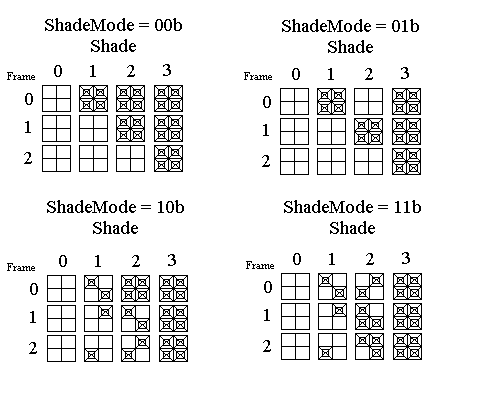
The ShadeMode bits are used to select a dithering technique whereby some pixels are modulated with a different phase from adjacent pixels. This might be useful for reducing flicker in the display.
The following figure illustrate the different frame-rate shading techniques. Each small square in the figure shows 4 adjacent pixels on the display. The upper leftmost pixel in each square corresponds to a pixel on an even numbered column and an even numbered scan line. The squares are grouped into 3 rows of 4 columns for each technique. The columns show how the pixels would be displayed for each of the 4 available shades. The rows show how the pixels are switched on and off in time (for different fram es) to modulate the intensity of each pixel.
For all techniques, shade 0 leaves all pixels always off and shade 3 leaves all pixels always on. Thus shades 0 and 3 result in intensities of 0% and 100% black. The differences in the techniques show up in how shades 1 and 2 are handled.
In technique 00, no dithering is employed and colors 1 and 2 are in phase (they turn on at the same time). Technique 01 is similar to technique 00 except that the colors are out of phase. In technique 10, dithering is used to spread the flicker but the colors are in phase. In technique 11, dithering is used and the colors are out of phase.
Bit-Dithered Shading
Bit-dithering is a technique that can be used in low-resolution graphics mode. In this
technique, dots on the display are grouped into pixels. The number of dots in the pixel
that are on correspond to the darkness of the pixel. Because the dots are not being
turned on and off, the frame-rate of the display can be set lower than it could if a
frame-rate shading technique were used. This would result in a corresponding power
savings.
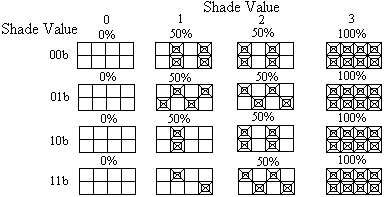
Using pairs of dots for a pixel, a pixel can take on one of four values according to which dots are on. However, this only yields three possible shades for the pixel. The two intermediate values result in a pixel that appears at half-intensity because half the number of dots are turned on. This results in possible shades of 0%, 50%, 50%, and 100% black.
There are several variations of this technique, where pixels can be grouped with adjacent pixels to achieve the appearance of more shades. In this way, this display controller can implement shades of 0%, 25%, 50%, and 100% black.
The shade value and the bit-dither technique selection bits are used to select a pattern for the dots according to the figure below. Each cell of the figure shows how four adjacent pixels (eight adjacent dots) would appear for a given color value and bit-dither technique. The upper-leftmost pixel (dot-pair) corresponds to an even numbered pixel on an even scan line.
The first two techniques result in effective shading intensities of 0, 50, 50, and 100 percent. The last two techniques result in effective shading intensities of 0, 25, 50, and 100 percent. The differences between techniques 00 and 01 and between 10 and 11 is that dithering is enabled across scan lines. This should help break up vertical bars that would occur if large areas of the display were set to the same color.