System Manager Memory Maps (Sequenced by Time)
Graphic
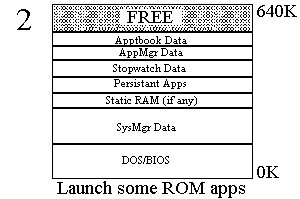
- System Manager starts and loads all Persistent Apps (applications that cannot be terminated). These are the alarm management app, Filer, DosTask (Ctrl+123 launching stub), and JTASK0 (Top card task).
Graphic
- Launch some ROM applications. Application Data areas include the application's Static data and stack (DS and SS), and any far memory allocations. All memory belonging to one application is contained in one DOS Memory Control Block (MCB). Application Code for ROM applications is bank mapped in above C000:0.
Graphic
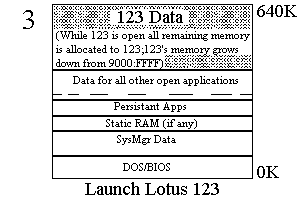
- Launch 123. 123 takes all free memory from the top down. As memory is freed by apps closing, that memory is returned to 123. If more memory is needed by apps or SysMgr, the SysMgr asks 123 to release a portion.
Graphic
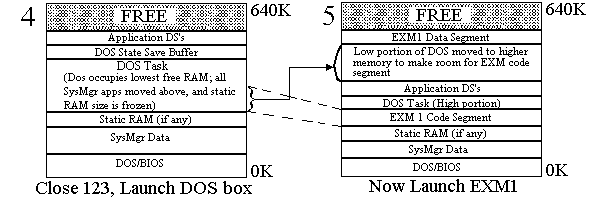
- Launch DOS. DOS requiring a fixed space is loaded at the lowest possible address. In addition to the block allocated for DOS, is the State Save Buffer (36K total: 16K CGA screen, interrupt vector table, BIOS Font stack, and other misc info), for restoring the state when swapping to/from the DOS task.
- Launch a System Manager Compliant RAM application or EXM (called EXM1). Like DOS, the EXM requires fixed space--if DOS is present, a chunk of the DOS task memory is moved out of low memory.
Graphic
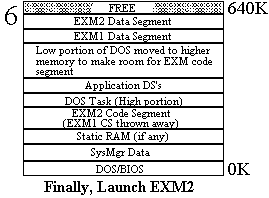
- Launch EXM2. Only one EXM Code segment is retained--any others are loaded from disk as needed.